Notes
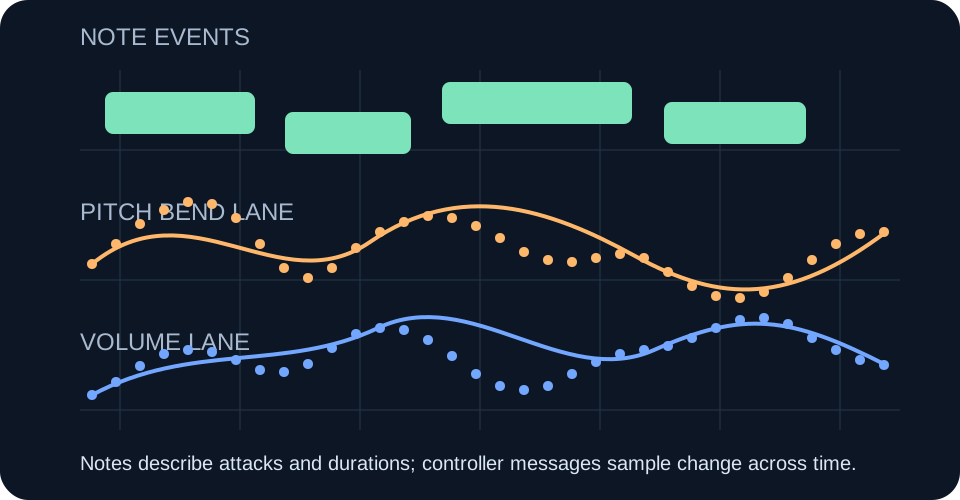
Note events describe attacks, releases, pitches, and velocities. One held note can occupy a long span without creating a new note at every moment.
MP3 to MIDI controller data
Controller data becomes hard to edit when a converter writes many time-sampled pitch or volume changes instead of a small set of note events. Each point may be valid, but a dense lane gives you far more breakpoints to inspect than the visible notes suggest.
Do not delete the lane blindly. Identify what it controls, keep the untouched MIDI, simplify a duplicate, and compare both versions against the source audio.
Try the MP3 to MIDI toolSeparate event layers
Note events describe attacks, releases, pitches, and velocities. One held note can occupy a long span without creating a new note at every moment.
Pitch-bend messages can describe movement between note positions. A curve needs values across time, not just one value at the note start.
MIDI Channel Volume is Control Change 7. A changing volume lane can contain its own timed values independently of note velocity.
The MIDI Association's message overview separates note, Control Change, and Pitch Bend messages. Its Control Change table identifies controller 7 as Channel Volume. That distinction explains why cleaning notes alone may leave two busy controller lanes untouched.
A documented historical rate
A 1998 Wildcat Canyon Software AutoScore FAQ described AutoScore Pro as producing pitch-bend controller messages at a rate of 20 per second. The same answer described volume messages at 20 per second. These were the vendor's statements about that historical product, not rates measured on this site and not evidence of transcription accuracy.
The two numbers explain an editing problem that a note count hides. If both streams were active, the vendor-described output could contain 20 pitch values plus 20 volume values in one second. The arithmetic is 20 + 20 = 40 controller messages per second. That total is a calculation from the two archived rates; the archive does not say every input always produced both streams or that every message changed the audible result.
Extending the same arithmetic makes the visual burden concrete. Five seconds at the stated rate would be 20 × 5 = 100 pitch-bend messages and another 20 × 5 = 100 volume messages, or 200 controller messages across the two lanes. This is not a benchmark, a file-size measurement, or a claim about modern converters. It is only the result of applying the vendor's two per-second rates to a five-second interval.
Why sample continuously? A note event can say that a pitch begins and ends, but it cannot by itself trace every point of a sung slide, instrumental bend, or changing level. The historical design represented those movements as sequences of timed values. When opened in an editor, the sequence appears as a crowded envelope even if the musical phrase contains only a few notes.
Density and correctness are different questions. A lane can be dense because the program sampled a changing control frequently. That does not prove that the detected curve follows the source, and a sparse lane does not prove that it is wrong. The archived FAQ provides no reference recording, error count, listener test, or comparison that would support either conclusion.
The same FAQ said recognition parameters could be customized for particular instruments. That statement is relevant to how the vendor framed recognition, but the surviving answer does not identify a universal preset, publish parameter values for named instruments, or show that customization reduced controller density. Those missing details should not be invented.
This also marks the boundary between this question and two nearby ones. The issue here is not what pitch bend means or how volume differs from velocity; those are covered in the site's pitch-bend and velocity pages. The distinct issue is why continuous data can create many editable points around a small number of notes.
The archived rates offer one clear historical example of that mismatch. Four sustained notes in a five-second phrase could still sit beside the calculated 200 controller messages if both vendor-described streams were present for the whole interval. The four-note example is hypothetical; the 200-message calculation comes from the documented rates. No claim is made that AutoScore emitted exactly that combination for a real performance.
Modern software may encode expression differently, omit one stream, use another sampling rate, reduce points, or store per-note expression. The 1998 page cannot establish present behavior. Its value is narrower: it proves that at least one early audio-to-MIDI product explicitly described frequent pitch and volume messages, giving a source-backed reason an old file could look much busier in controller view than in piano roll.
The rates, product capability, and instrument-parameter statement above belong to Wildcat Canyon Software's 1998 FAQ. The calculations are shown so they can be checked; none is an accuracy, speed, or quality measurement for the current tool.
A reversible cleanup test
Ableton's current support page says Simplify Envelope reduces the number of breakpoints and makes recorded automation easier to edit. Other editors use different names or may not offer an automatic reducer, so confirm the command in your own software rather than following an assumed menu path.
Check this tool's output
The current browser tool on this site writes detected notes with pitch, start time, duration, and velocity. Its export code does not add pitch-bend or continuous controller lanes. You can test that statement without trusting the page: download a result, open the MIDI event list in your editor, and look for Pitch Bend or Control Change events.
If the event list contains only notes, controller-density cleanup is not the right fix for that file. Diagnose note timing, pitch, duration, or velocity instead. If a file from another converter does contain dense controller data, use the reversible lane-by-lane test above.
FAQ
No. Note messages and Pitch Bend messages are different MIDI message types. A note can stay held while a sequence of bend values moves its sounding pitch.
No. Velocity belongs to a note event, while CC7 is a Channel Volume controller. They can influence loudness differently depending on the receiving instrument.
No. First identify the lane and compare an edited copy with the untouched file and source audio. Deleting a lane can remove intended bends or level movement.
No. That rate is attributed only to AutoScore Pro in a 1998 vendor FAQ. This article does not use it as a current standard or benchmark.
Sources