Clear solo line
Import the MP3, isolate a short region where one pitched part dominates, turn on Flex Pitch in the Audio Track Editor, correct obvious analysis errors, then choose Create MIDI Track from Flex Pitch Data.
Convert MP3 to MIDI Logic Pro workflow
Logic Pro can create MIDI from an audio region after Flex Pitch is active. Use that route for a clear single-note vocal or instrument, not as a promise to rebuild every part of a finished mix. Keep the MP3 untouched, create the first MIDI extraction, duplicate that region for editing, and compare all three before export.
An MP3 stores recorded sound; MIDI stores note and performance instructions. Logic Pro must infer those instructions, so the generated region is an editable estimate rather than the original session.
Convert the MP3 locally before the Logic Pro handoffChoose the source before the command
Import the MP3, isolate a short region where one pitched part dominates, turn on Flex Pitch in the Audio Track Editor, correct obvious analysis errors, then choose Create MIDI Track from Flex Pitch Data.
Apple states that the command works best with monophonic material and that chords or polyphonic material may be interpreted incorrectly. Do not treat a confused region as a complete transcription of the mix.
If you already have a .mid, import that file and keep the MP3 beside it as the audible reference. This avoids running another detector merely because the destination is Logic Pro.
Confirm that you opened the audio region in the Audio Track Editor, showed Flex there, and selected Flex Pitch for the audio track. Apple documents the MIDI command in that editor after Flex Pitch is enabled; a public Logic Pro discussion also reports the command becoming available only after Flex was active in the relevant editor.
Original reproducible method
A Flex Pitch extraction can look convincing in the Piano Roll while still hiding a wrong start, an octave jump, or several fragments under one sung note. Preserve three states so you can prove whether the source, the extraction, or your edit introduced the change.
The checkpoint also prevents a common category error. If SOURCE contains several instruments, RAW may be internally consistent yet musically incomplete because Flex Pitch was asked to interpret material outside its documented monophonic strength. In that case, change the source or extraction route instead of polishing every false note.
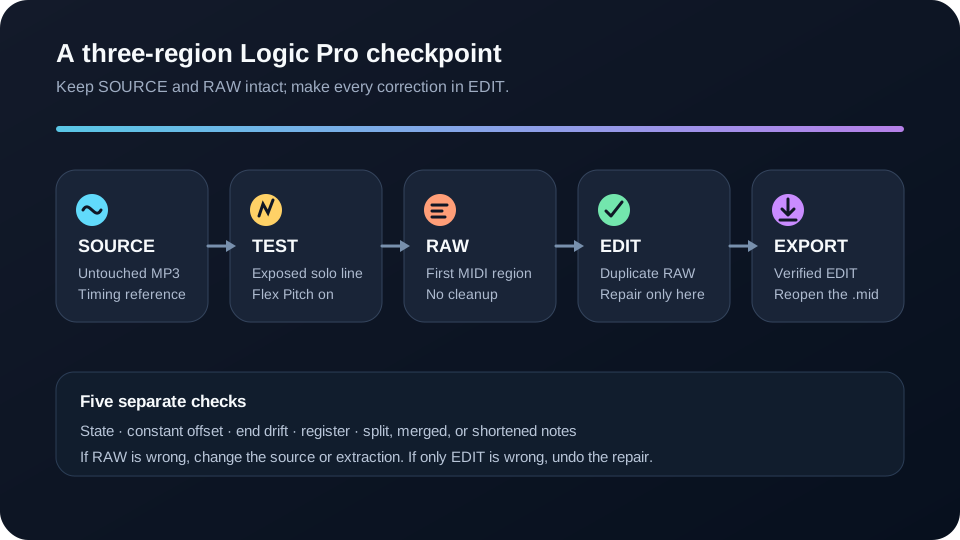
Original reversible audit
Solo SOURCE, RAW, and EDIT one at a time over the same short passage. Make one class of correction per pass. Starting with global quantization can move correct expressive timing while leaving the real extraction error untouched.
After each pass, alternate SOURCE and EDIT without changing the playhead range. Keep RAW muted but visible. This creates a simple decision rule: a defect heard in RAW came from the source or extraction; a defect heard only in EDIT came from your correction; a defect heard only after export came from the handoff.
Finish the handoff
Save the Logic Pro project while SOURCE, RAW, and EDIT are still identifiable. Export the verified EDIT region as a Standard MIDI file, then import that file into a new empty track or a separate MIDI reader. Confirm that it begins where expected, contains notes, and preserves the repaired passage.
This final reopen check distinguishes a good Piano Roll edit from a good deliverable. It catches an empty export, the wrong selected region, or an accidental export of RAW before the source comparison is dismantled.
FAQ
Yes. Logic Pro can create a MIDI region from an audio region when Flex Pitch is active, and Apple says the process works best with monophonic material.
Open the audio region in the Audio Track Editor, show Flex, and choose Flex Pitch for that audio track. The command belongs to that Flex Pitch workflow, so verify the editor and track state before troubleshooting the notes.
Not as one automatic Flex Pitch command. Apple warns that chords or polyphonic material can produce interpretation errors, and a mixed recording does not contain the original separated MIDI parts.
Pitch changes, overlapping instruments, reverb, and noisy attacks can be interpreted as separate note events. Compare RAW with the source, then merge, resize, or delete only the events that fail that audible check.
No. First test constant offset, drift, register, and note shape against the MP3. Quantize only the notes that should follow the chosen grid after those different errors have been separated.
Sources