Convert MP3 to MIDI in FL Studio: Three Routes and a Safe Edit Check
For a clear single-note line, FL Studio can detect notes with Edison or NewTone and send a score to the Piano roll. For a mixed or unsupported MP3, convert it to a .mid first and import that file. Whichever route you use, preserve the first raw score before quantizing, deleting, or moving notes.
An MP3 contains recorded sound. MIDI contains note and controller instructions. The conversion estimates those instructions; changing the file extension does not perform that analysis.
Edison, NewTone, and imported MIDI solve different jobs
Edison: short pitched material
Image-Line documents an Edison command that slices the sample, detects pitch for each slice, and dumps a score to the Piano roll of the selected Channel. Use it when one pitched part is clear enough to inspect as notes.
NewTone: vocal or melodic pitch
NewTone displays detected notes for pitch and time editing, can send the score to the Piano roll, and can save the detected result as MIDI. It is the more inspectable route for a solo vocal or melody that needs pitch-boundary review.
External transcription: file handoff
If you already have a converted .mid, import it instead of re-detecting the MP3. FL Studio's MIDI import can select tracks and channels, blend with existing data, or realign events. Keep those choices visible rather than accepting an unexplained default.
Do not expect a full mix to become the original session
A single MIDI instrument cannot preserve every timbre, drum hit, harmony, and production effect inside a finished MP3. Decide which musical line you need, then judge that line rather than the sound of the whole recording.
Original reproducible method
Create a raw-pattern checkpoint before cleanup
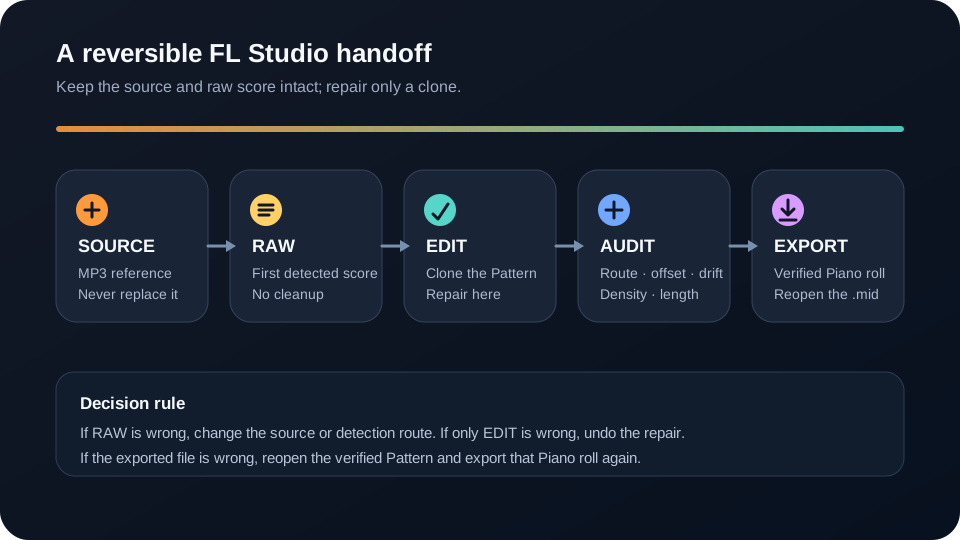
The first detected score is evidence. Preserve it before the Piano roll starts looking tidy. A clean-looking edit can hide whether the converter, the selected Channel, the Playlist placement, or the later correction caused the mismatch.
Name the target before detection. Select the intended instrument Channel and an empty Pattern before using Edison or NewTone. Edison sends its score to the currently selected Channel, so a wrong destination can sound like a bad conversion even when the note data is present.
Keep the MP3 as the reference track. Put the source audio in the Playlist without replacing it. The waveform is not editable MIDI, but it is the timing and phrasing reference for every later decision.
Label the first score RAW. Place the detected Pattern beside the audio and do not quantize, transpose, shorten, or delete anything in this copy. If you imported a .mid, keep the first imported Pattern for the same reason.
Clone an EDIT copy. Make all repairs in the duplicate Pattern. The raw copy answers a question that Undo history cannot always answer later: did the detector create this problem, or did the editing pass create it?
Save the project before export. The FL Studio project preserves the comparison workspace. Exporting MIDI is a deliverable step, not a substitute for saving the project and its raw checkpoint.
This checkpoint costs one extra Pattern, but it makes every repair reversible. It also lets you compare alternative cleanup choices without rerunning detection and receiving a result you cannot prove is identical to the first pass.
Preserve the source and raw score, edit only a clone, then export the verified Piano roll.
Original reversible audit
Diagnose routing, offset, drift, and density separately
Place the MP3, RAW Pattern, and EDIT Pattern at a shared reference point in the Playlist. Use track mute or solo controls to hear one version at a time. Do not start with global quantization: first identify which class of error is actually present.
Routing pass. Solo the RAW Pattern. If the Piano roll contains notes but you hear the wrong sound or nothing, inspect the selected instrument and Channel routing before changing pitches. MIDI describes performance data; the assigned instrument creates the sound.
Offset pass. Compare one unmistakable attack near the beginning. If the entire Pattern is early or late by a similar amount, move the Pattern as one object. FL Studio allows snap to be bypassed temporarily while positioning, so you do not need to force the reference onto a coarse grid.
Drift pass. Compare a second attack near the end. A correct start with a wrong ending indicates timing or tempo drift, not a constant offset. Moving every note together cannot fix a gap that grows across the passage.
Density pass. Look for clusters of short notes under one stable tone, or notes that appear only with drums, reverb, or overlapping parts. Delete a small cluster in EDIT, replay the same bar, and compare it with RAW before making the deletion permanent.
Length pass. Check where intended notes stop. Shortening every note can create gaps; lengthening every note can create overlaps. Adjust only the events whose audible ends disagree with the reference.
After those passes, use Piano roll tools for deliberate correction. Quantize only the events that should follow the chosen grid. Transpose only when the contour is right but the register is consistently wrong. Keep the RAW Pattern muted rather than deleting it until the exported file has been reopened and checked.
Take away the verified result
Export the edited Piano roll, not the whole project by accident
Image-Line distinguishes an individual Piano roll export from project-wide MIDI export. For one repaired part, use the Piano roll's Export as MIDI file option. Project-wide export uses a separate preparation step that can replace Channel instruments with MIDI Out channels, so save the project before using it.
Reopen the exported .mid in a new Pattern or another MIDI reader and confirm its start, duration, and note count visually. This final check proves that you exported the edited score rather than the raw checkpoint or an empty destination.
FAQ
Questions about converting MP3 to MIDI in FL Studio
Can FL Studio convert MP3 to MIDI directly?
Yes, for suitable pitched material: Edison can convert detected slices to a Piano roll score, and NewTone can send detected melodic notes to the Piano roll. Dense mixes may still need an external transcription route or a more isolated source.
Should I use Edison or NewTone for audio to MIDI?
Use Edison for a quick score from clear pitched audio and NewTone when a vocal or melodic line needs visible pitch and note-boundary inspection before it is sent to the Piano roll.
Why did an MP3 become only one MIDI instrument?
Because MIDI note data is separate from the original recording's timbres and mix. A single detected score assigned to one instrument cannot recreate every part of a finished MP3.
Why is the converted MIDI in the wrong place in FL Studio?
Check the selected Channel, Pattern, and Playlist start position first. A routing or constant-offset error should be fixed globally before individual notes are moved.
How do I save the converted notes as a MIDI file?
After verifying the edited Pattern, use the Piano roll menu's Export as MIDI file command for that part. Save the FL Studio project separately so the source, RAW checkpoint, and EDIT Pattern remain available.