One clear line
Start with the local tool and inspect the downloaded MIDI. Move to a specialized route only when the output shows a specific limitation.
Best MP3 to MIDI converter
The best MP3 to MIDI converter depends on what is inside the MP3 and what you need afterward. For one clear pitched part and a private, no-account .mid download, start with Audio Into MIDI. Choose a notation-oriented service when you need MusicXML or a readable score, and choose a multitrack route when the source is a full mix.
Do not select a tool from a generic “best” score. Compare the same four boundaries every time: source complexity, deliverable, account or processing model, and the cleanup you can verify.
Try the local MP3 to MIDI toolDirect answer
Audio Into MIDI is the simplest fit here when the source is a clear melody or instrument line, the required output is one editable MIDI file, and local browser processing matters. Jukeblocks presents a compact MP3-or-WAV-to-MIDI route and points full-song users toward a separate multitrack product. Songscription presents transcription, score, MIDI, MusicXML, Guitar Pro, link, upload, and recording routes. AI-MIDI presents instrument-specific models, preview access, and a sign-in boundary for MIDI download.
Those products do not promise the same deliverable. A single .mid, a separated multitrack result, and an editable score should not be treated as interchangeable.
The product facts below were checked on the vendors’ public pages on October 24, 2026. This page does not claim a conversion-accuracy score, permanent price, permanent limit, or universal ranking.
Current public product boundaries
| Route | Current input path | Stated output | Access or processing boundary | Use it when |
|---|---|---|---|---|
| Audio Into MIDI | MP3, WAV, FLAC, OGG, supported M4A, or browser recording | Detected-note preview and one downloadable MIDI file | No account; the selected audio is decoded and processed locally in the browser | You need a quick draft from a clear pitched part and want the audio to remain on the device |
| Jukeblocks | Its public converter currently lists MP3 and WAV upload | Standard MIDI file | The page presents a browser converter and separates its full-song Recreate route | You want a focused file-to-MIDI task and accept that a busy mix may need editing |
| Songscription | Its public page currently presents upload, supported links, and recording | Score, MIDI, MusicXML, Guitar Pro, and interactive notation or piano-roll views | Free and paid boundaries differ by duration and export; check the current page before committing | Your real deliverable is notation, instrument-specific transcription, or a mixed-source workflow |
| AI-MIDI | Its public tool currently presents audio file, recording, and beta video paths | MIDI preview and downloadable MIDI | The page says preview first and sign in to download; model availability also varies | An available instrument model matches the source and the download sign-in boundary is acceptable |
The table describes current public interfaces, not measured quality. A listed feature says what the page offers; it does not prove that one service will identify more correct notes from your recording.
Original decision rubric
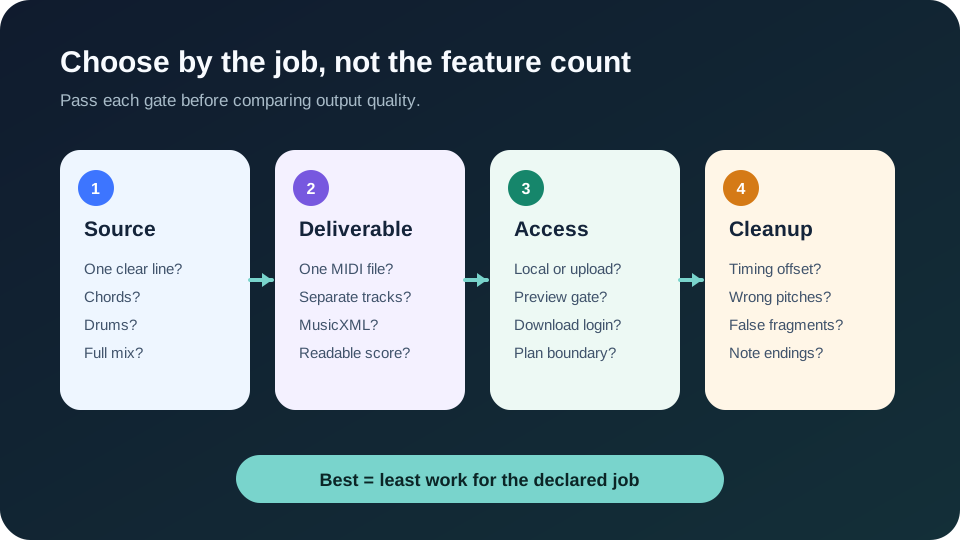
“MP3” does not tell a converter whether the audio contains one whistle, a piano chord, drums, or a mastered song. Mark the source as a single exposed line, a chordal instrument, percussion, or a full mix. If several instruments overlap, decide whether you want one line or several separated parts before uploading anything.
A tool can accept the file format and still be the wrong analytical route. Format compatibility is only the door; source complexity is the job.
Choose one primary result: a rough piano-roll melody, one replacement instrument part, separate MIDI tracks, printable notation, or MusicXML for a score editor. If you cannot name the deliverable, every feature list will look useful and no result will feel complete.
Use a simple MIDI converter for a note draft. Use a multitrack route when separation matters. Use a notation route when rests, voices, measures, and export to score software matter. Do not pay for notation when you only need a synth trigger, and do not expect a single MIDI track to behave like an orchestrated score.
Separate four questions that comparison pages often merge: Does the audio leave the device? Is an account required to preview? Is an account required to download? Is the required model or export behind a plan? Record the answer for the exact action you need, not for the product as a whole.
This gate is especially useful when a page says “free” but applies different rules to preview, download, duration, model, or export. Unknown fields should remain unknown until the current product page or an actual attempt answers them.
Decide what you are willing to repair: a global timing offset, a few wrong pitches, short false notes, missing note endings, or a complete voice separation. That list becomes the stopping rule. Without it, a visually impressive piano roll can hide hours of editing.
A converter passes this gate when the output reduces work for your stated deliverable. It does not need to recover every sound in the MP3. Conversely, a result can contain many notes and still fail if those notes do not represent the part you intended to edit.
Reproducible comparison
This method produces a result another person can inspect: the source class, chosen settings, untouched files, observed failures, and repairs. It avoids invented percentages and makes the word “best” mean “least work for this declared job.”
If a service cannot complete the required output without a login, plan, unsupported format, or unavailable model, record that boundary before judging note quality. Access failure and transcription failure are different findings.
Quick choice
Start with the local tool and inspect the downloaded MIDI. Move to a specialized route only when the output shows a specific limitation.
Decide whether you need one exposed part or separate tracks. A stem or multitrack route is a different job from one-track note detection.
Prefer a service that explicitly produces notation or MusicXML. A generic MIDI file does not preserve a finished score layout.
FAQ
The best free route depends on the required output and free-tier boundary. For a local, no-account MIDI draft from a clear pitched part, start with Audio Into MIDI; verify other services’ current preview, download, duration, and model rules on their own pages.
Only choose a route that explicitly offers separation or multitrack transcription. A single-track MP3-to-MIDI converter should not be assumed to divide vocals, bass, drums, and chords.
Use the same representative source, preserve default settings and untouched outputs, then compare observable repairs such as timing offset, wrong pitches, false fragments, and note endings.
No. A larger note list can include duplicates, harmonics, or short false fragments. Judge whether the result reduces editing work for the part and output you defined.
Sources